
For estate agents and advisers
Qualify your buyers with your own Spanish mortgage calculator.
Free, in your colours and your visitor’s language. A buyer sees what they could borrow in Spain, the monthly payment and the buying costs for their region, then leaves their details with you and walks away with a PDF of the estimate in your branding. Two minutes to add, and we keep the figures current.
Foxes Finance & Legal, near Malaga, working with buyers across Spain. Regulated by the Bank of Spain, D470.
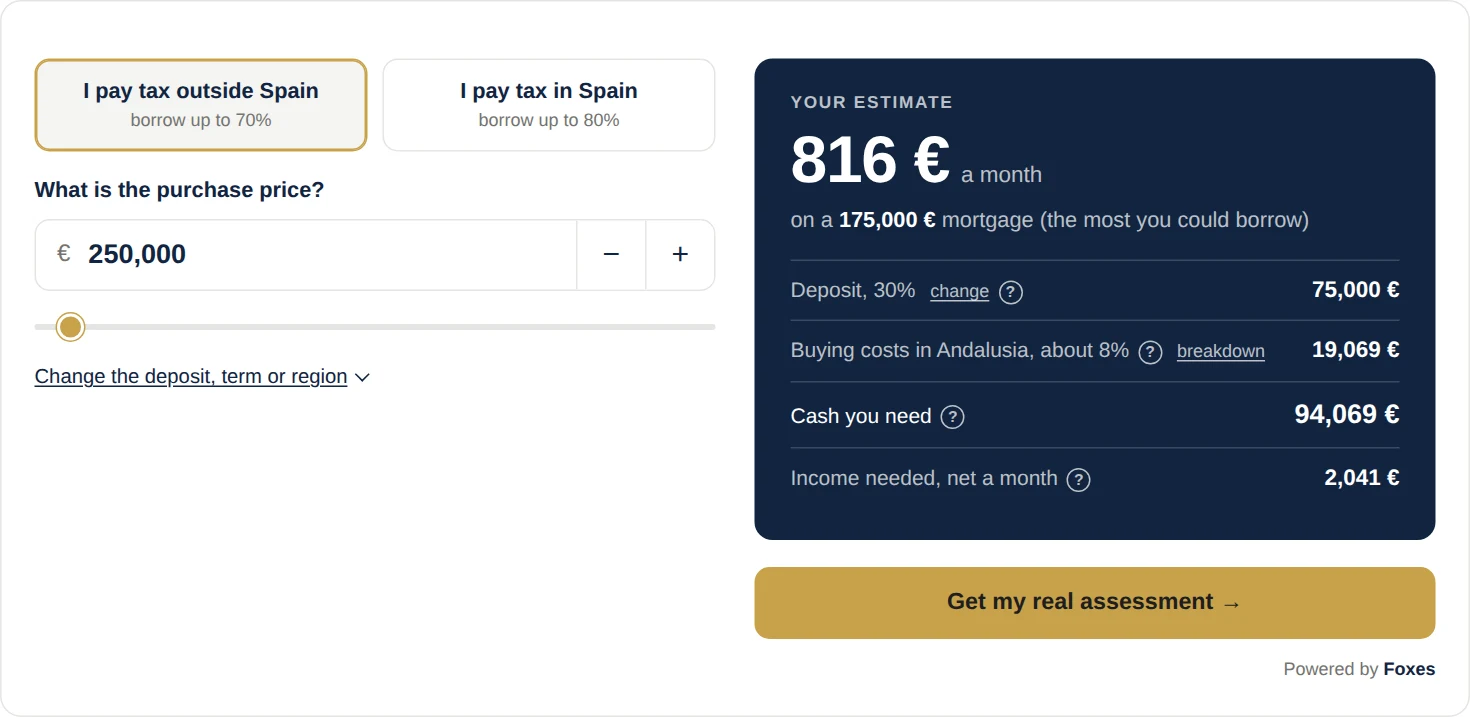
The calculator
Test and customise the calculator
Change the price, the deposit or the region and the figures update. It uses the same cost engine as the calculator on our own site, so the numbers match to the euro.
These controls are here so you can see the calculator in different colours. They are not part of the calculator, and your visitors never see them.
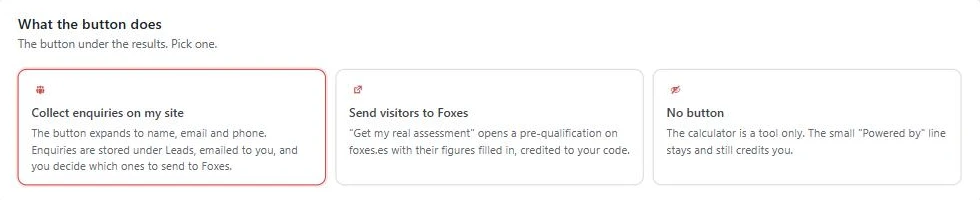
On your site this button opens your enquiry form and the buyer gets a PDF of their estimate in your branding. Here it sends them to us instead.
Works with
- WordPress
- Elementor
- Wix
- Squarespace
- Webflow
- Divi
- Any HTML site
Logos are trade marks of their respective owners, shown for compatibility only. No affiliation or endorsement is implied.
Enquiries
The enquiry lands in your dashboard
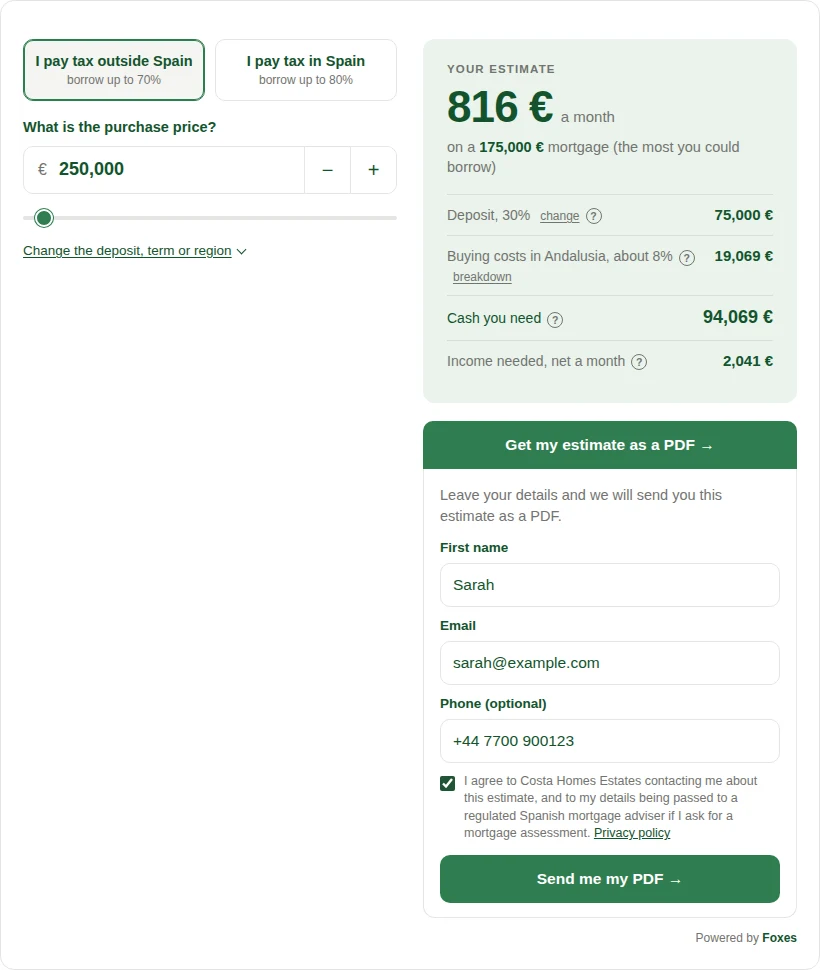
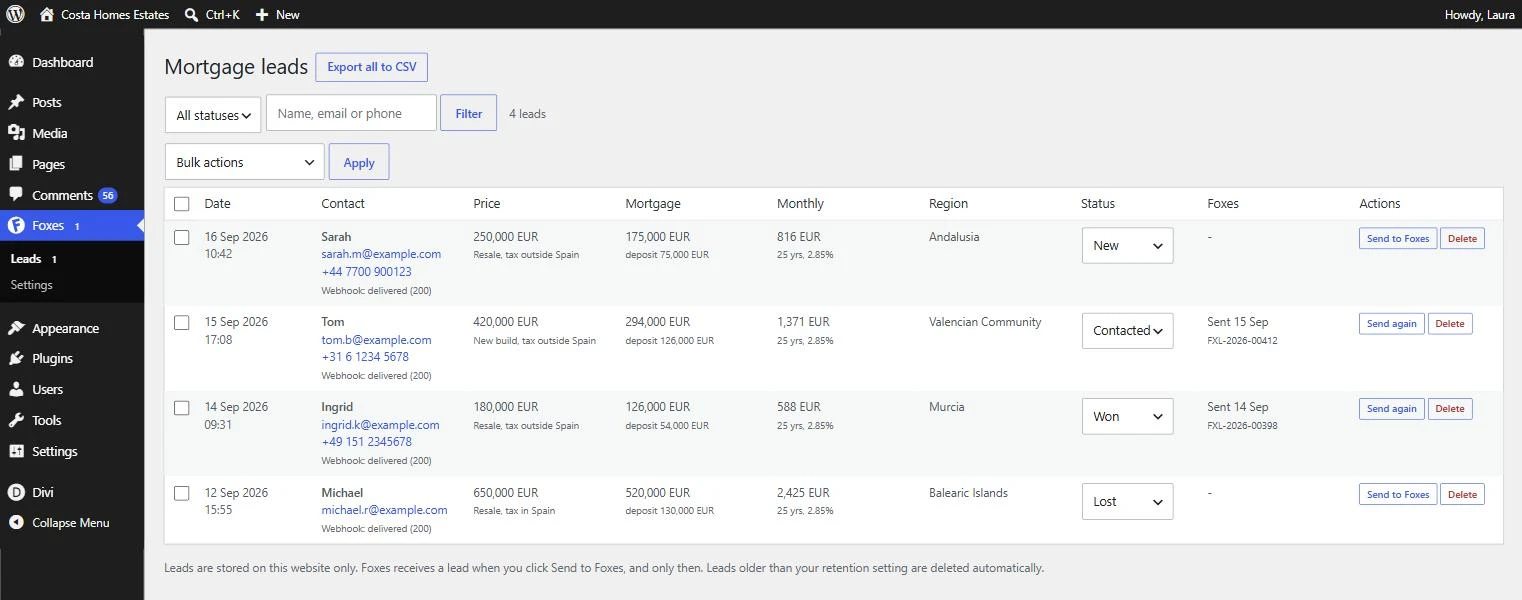
Set the button to collect enquiries and it expands into a short form under the results. The buyer leaves a first name, email and phone, and the enquiry arrives in your own WordPress dashboard with the figures they ran: price, deposit, region, monthly payment. It is your lead. Nothing reaches us unless you send it.
Emailed to you
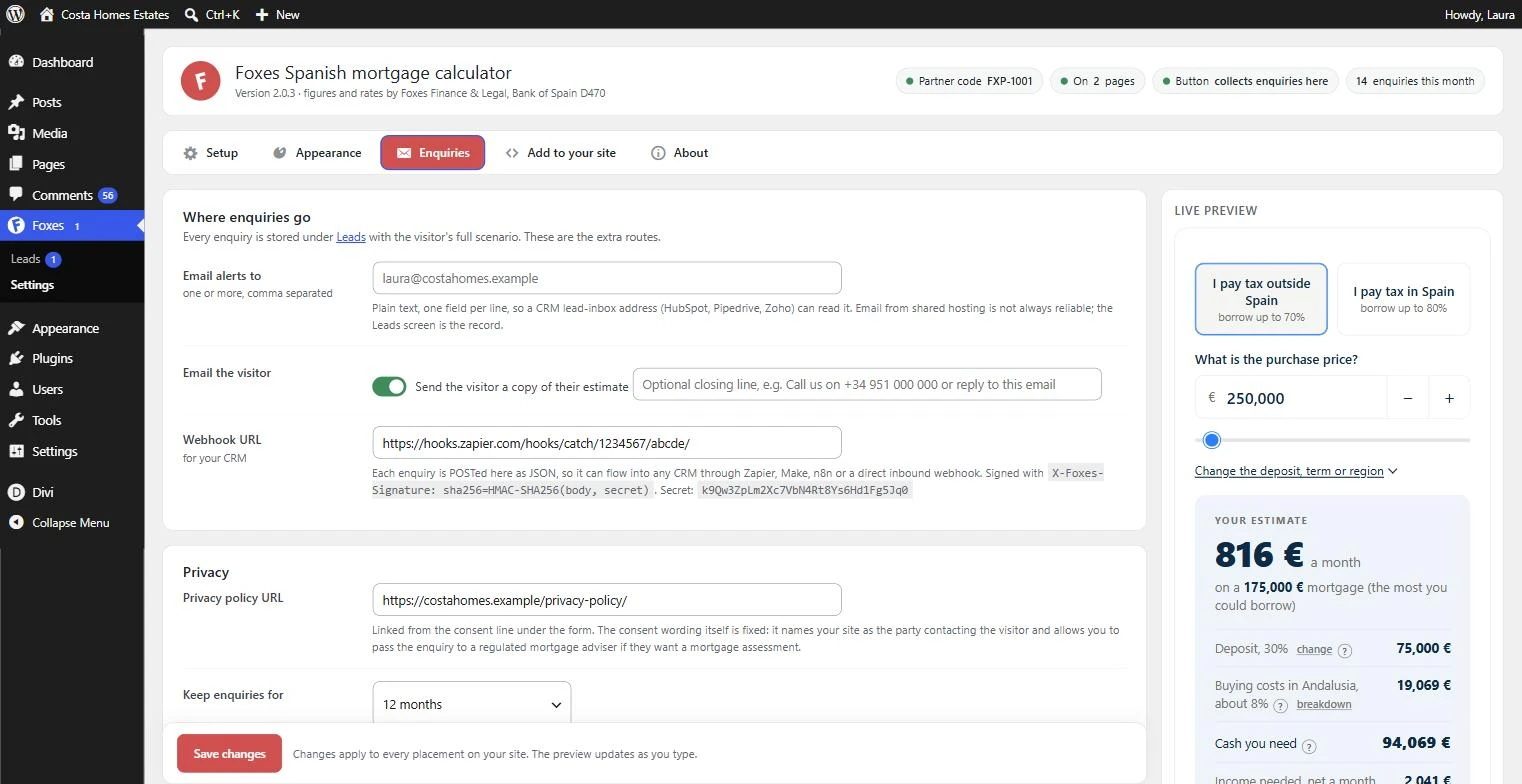
Every enquiry goes to the addresses you choose, as plain text a CRM lead inbox can read. The buyer gets a copy with the PDF attached, and the opening line and sign-off are yours to write.
Into your CRM
Add a webhook URL and each enquiry is posted as signed JSON. HubSpot, Pipedrive, Zoho, Salesforce or a Google Sheet, directly or through Zapier, Make or n8n.
Worked from your dashboard
A status on each enquiry (new, contacted, won, lost), search, CSV export, and a retention period you set.
Sent to us when you choose
One click sends an enquiry to Foxes under your partner code. The buyer agreed to that in the form, and you earn the referral fee if it completes.
The enquiry form is part of the WordPress plugin, because that is where your enquiries are stored. On Wix, Squarespace and the other platforms the button sends the visitor to us with your code instead.
The PDF
Your buyer walks away with a PDF in your branding
The moment a buyer sends the form, their estimate downloads as a PDF with your logo, your colours and your contact details, and the same file is attached to the emails. Three pages: their figures, what each figure means in their own numbers, and the buying process step by step. Our name is not on it.
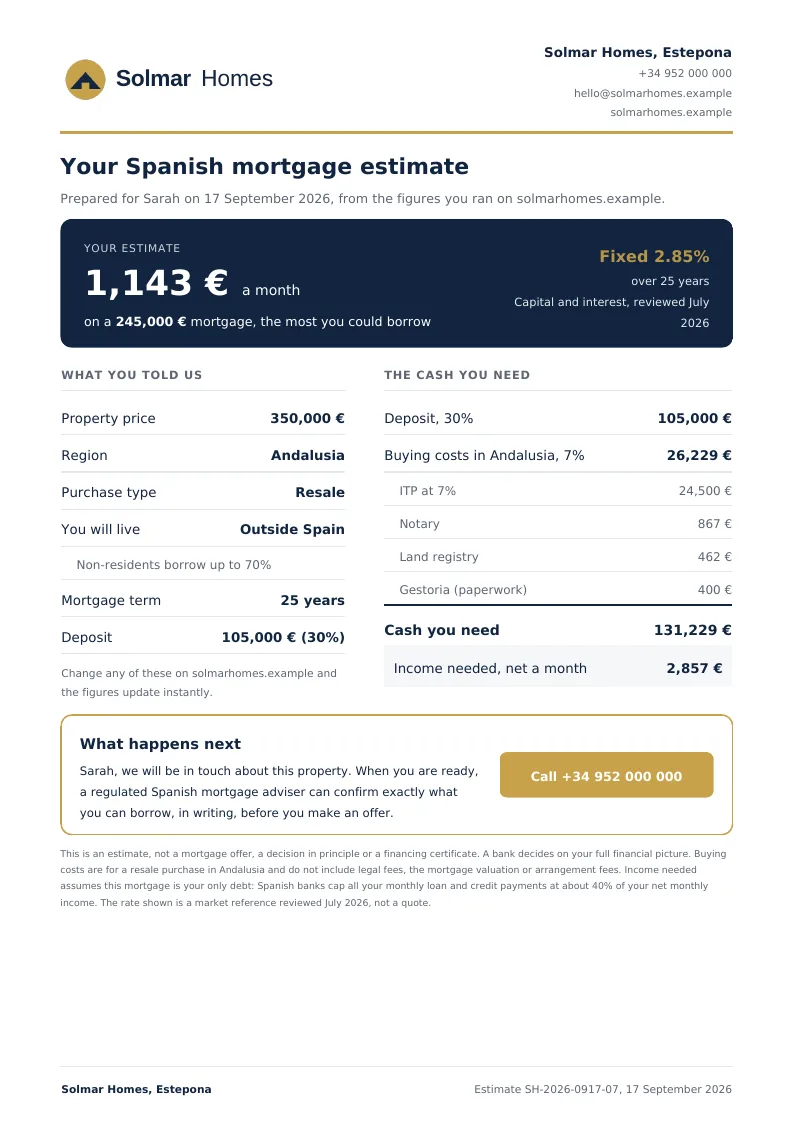
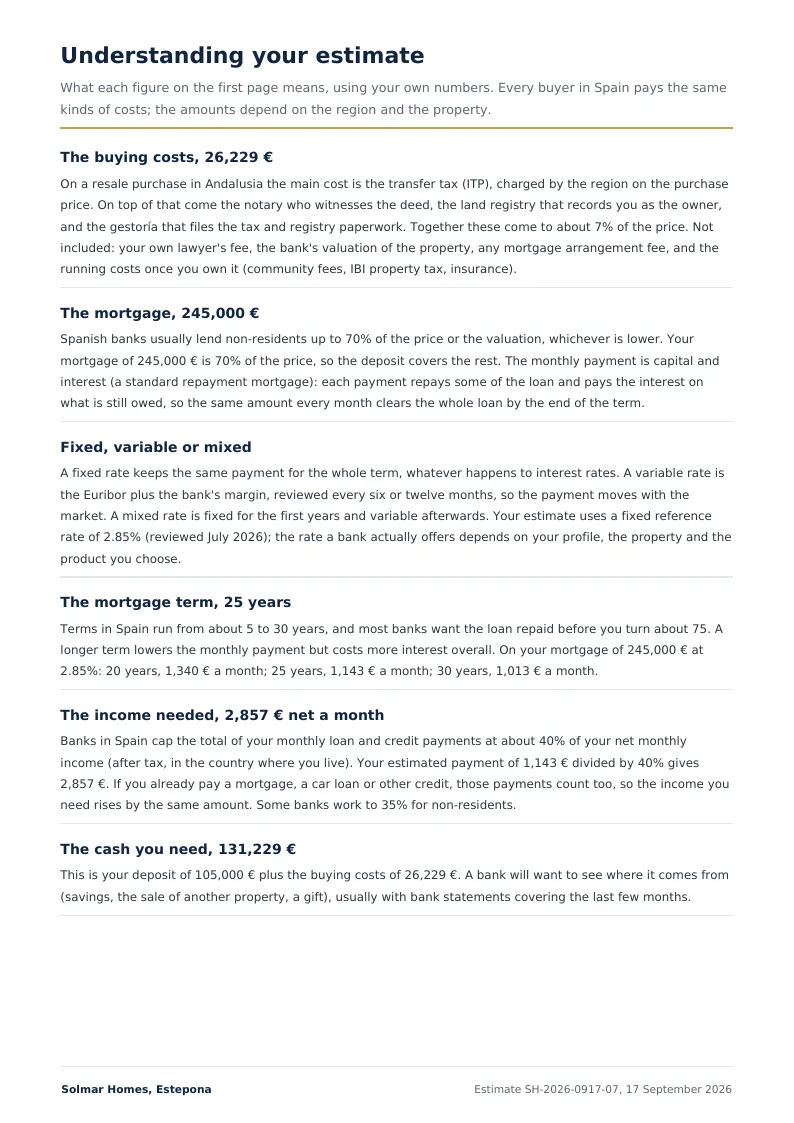
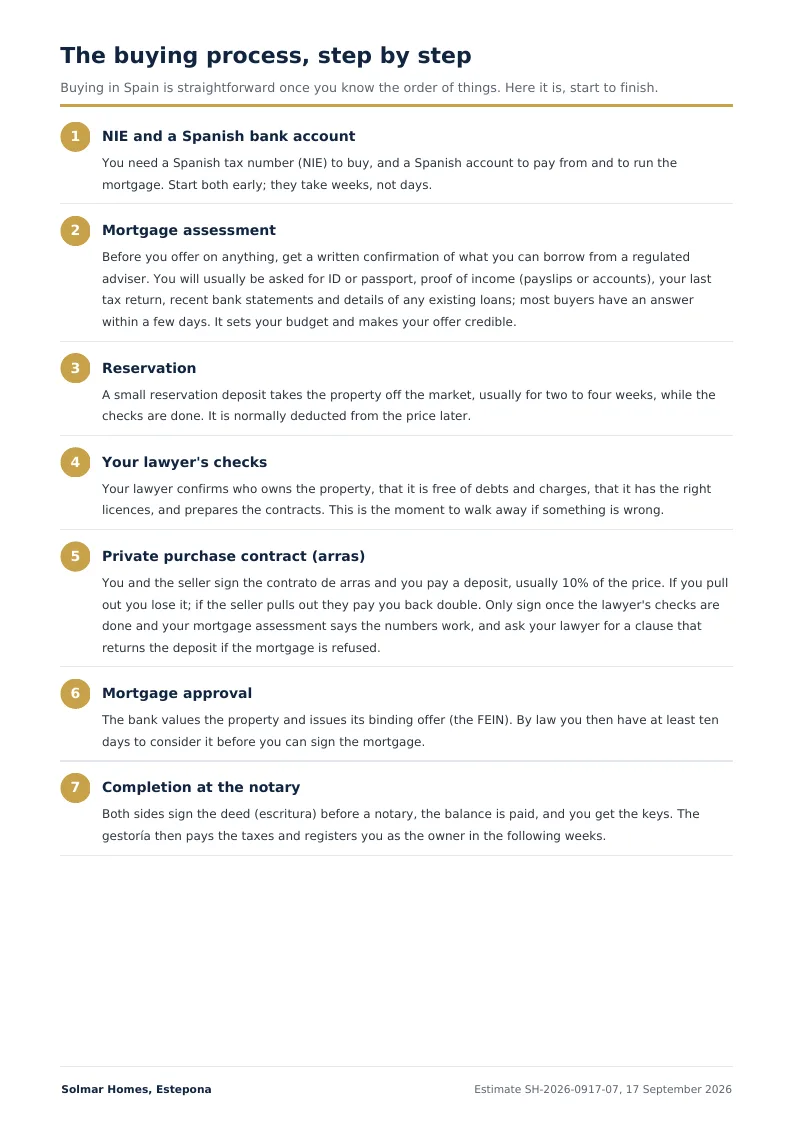
Your logo, your details
Upload a logo, add your company name, phone and website. The PDF takes the colours from your calculator settings, so it matches without any extra work.
Explains the numbers for you
Buying costs and what is left out, how much banks lend, fixed against variable, what the term does to the payment, the 40% income rule. Written for a first-time buyer in Spain, in their language.
The process, start to finish
NIE and bank account, mortgage assessment, reservation, the lawyer’s checks, arras, approval, notary. Seven steps, so the buyer knows what comes next and calls you at the right moment.
Preview before anyone sees it
One button in the settings opens a sample with your branding. Keep the explainer pages or switch them off for a one-page estimate.
What you get
Every calculation is a buyer who knows their budget
Completely free
No paid tier, no trial that runs out, no charge per view.
It looks like your site
Five colour controls, your own font, and your logo on the buyer’s PDF. One small credit line under the calculator is the only mention of us.
Nothing to maintain
We keep the rates, lending limits and tax data for all 19 regions current. You do nothing.
Seven languages
It reads your site’s language and matches it, number formatting included.
The difference
A generic calculator leaves your buyer short
Most mortgage calculator plugins are built for the American market, a few for the British one. They work in dollars, ask for a down payment and PMI, and apply lending rules that do not exist here. None include the Spanish purchase taxes, so a buyer who budgets from one arrives short by the 10 to 12 percent that ITP, notary, land registry and gestoria actually cost. You are the one who has to correct that later.
-
Transfer tax (ITP) on a resale
✓All 19 regions, banded and reduced rates
—Not included
-
New build
✓VAT plus stamp duty (AJD), IGIC in the Canaries
—Not included
-
Notary, land registry, gestoria
✓Included at the regulated scales
—Not included
-
Maximum loan
✓70% for buyers taxed outside Spain, 80% for residents
—One figure, set for its home market
-
Income test
✓40% of net monthly income, the Spanish rule
—US or UK affordability rules
-
Currency and language
✓Euro, in seven languages
—Usually dollars, in one
-
Fields that do not apply here
✓None
—Often PMI, escrow, US property tax
Figures are estimates, not a mortgage offer. Legal fees and mortgage set-up costs are listed separately and are not counted in the buying costs figure.
Customisation
Fully customisable
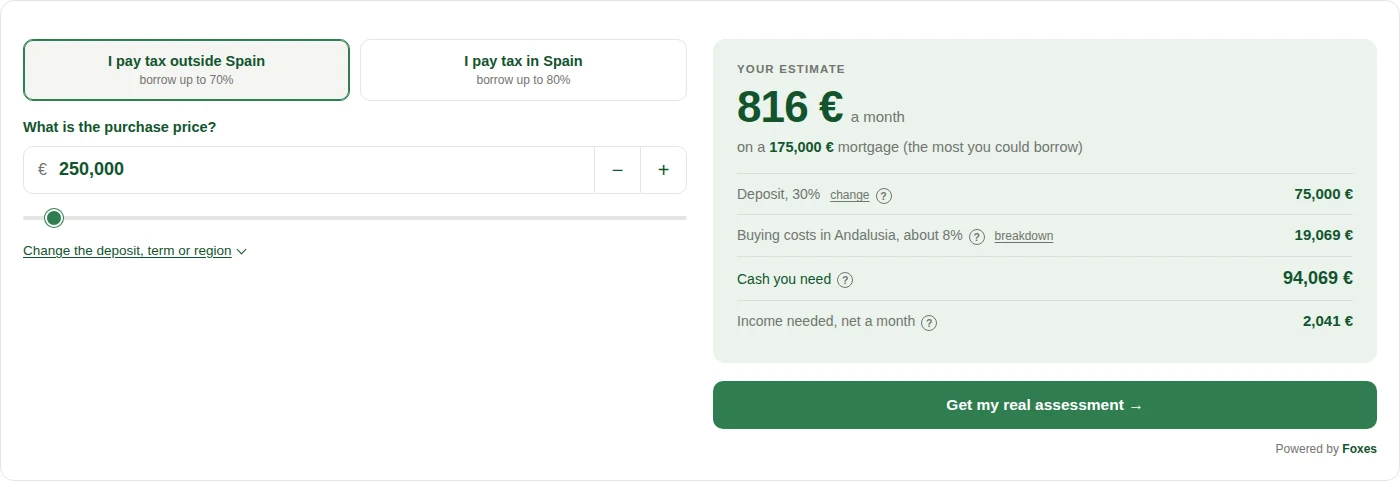
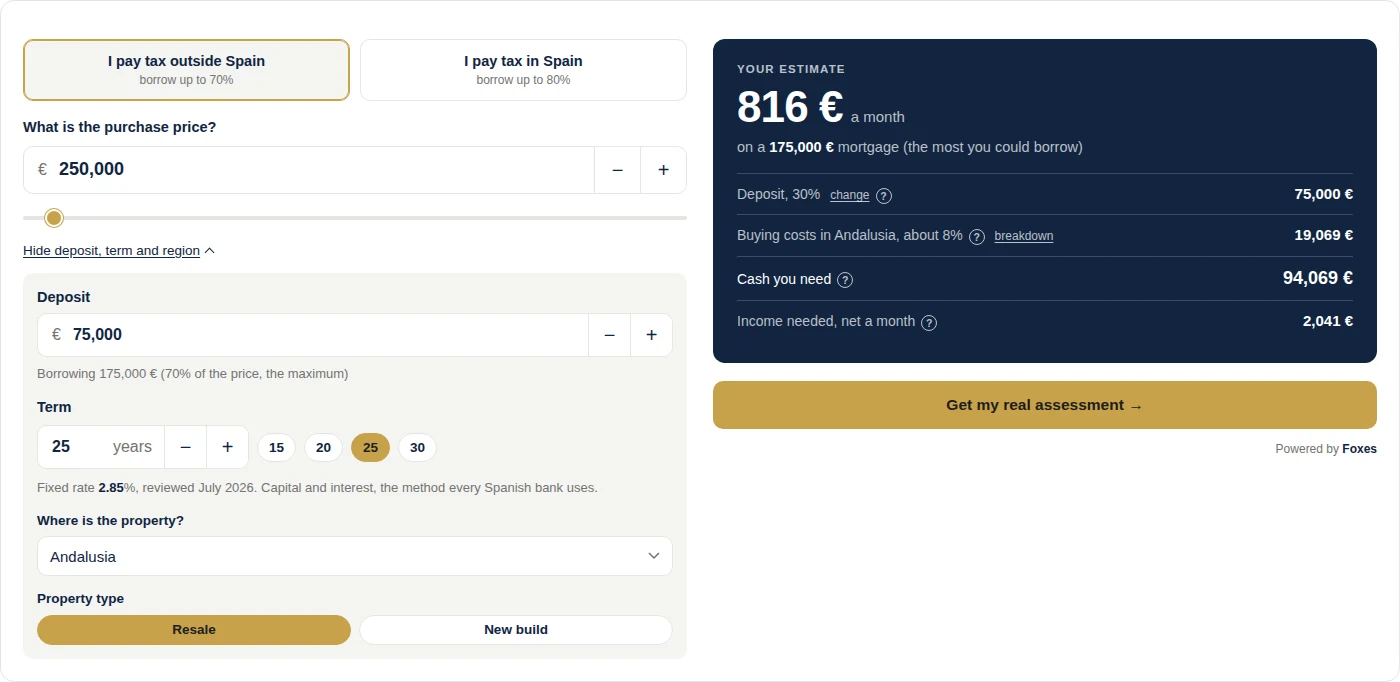
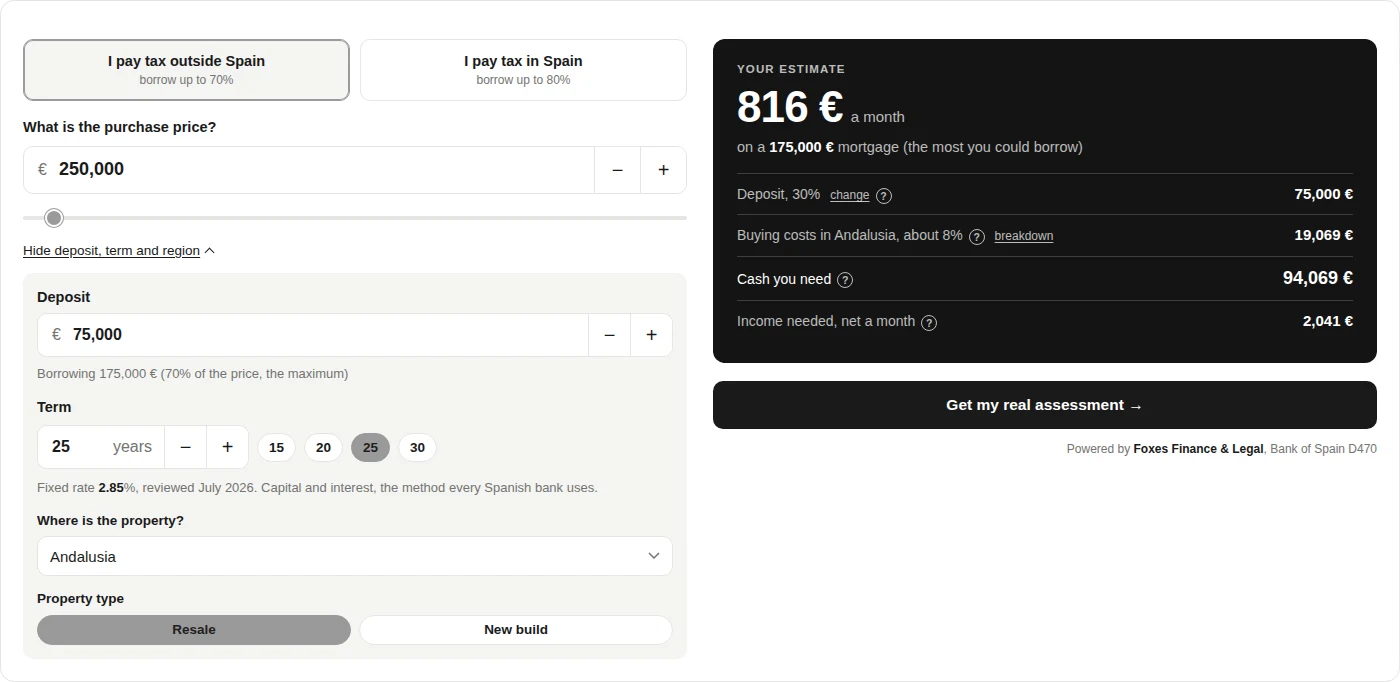
Colours, font, language, starting region and property type. Everything below is the same calculator showing the same figures.
Five colours and your own font
Set them once in the settings page. The bottom two have the deposit, term and region panel open, which is what a visitor sees when they dig in.
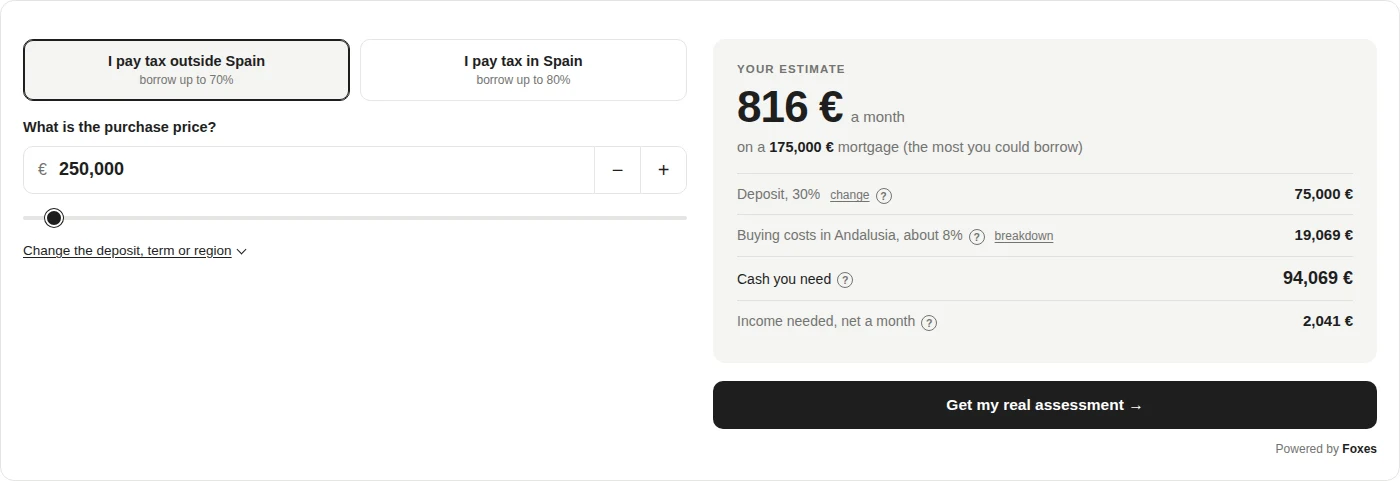
Seven languages
It reads your site’s language and matches it, number formatting included.
 EnglishFixed rate
 EspañolTipo fijo
 NederlandsVaste rente
 DeutschFestzins
 FrançaisTaux fixe
 NorskFastrente
 SvenskaFast ränta
One line from the results panel, in each language.
Spanish tax, region by region
Transfer tax is set regionally and the gap runs to thousands of euros. A new build is taxed differently again.
All 19 regions, including the banded and reduced rates.
Andalusia shown. Both follow whichever region is picked.
Controls
Everything you can change
One settings page, with a live preview beside it that updates as you type. No CSS, no developer.
- Partner codeCredits referrals to you. Optional: the calculator and the enquiry form work without one.
- Title and subtitleOr leave them off and use your own heading.
- Starting regionWhere your buyers mostly purchase. Visitors can change it.
- FontFollows your theme unless you pick another. It never downloads a font.
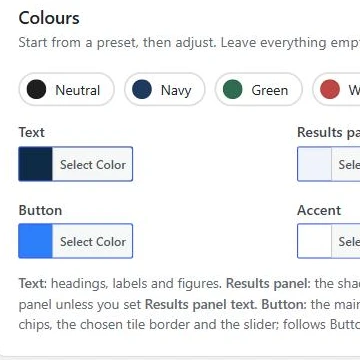
- Five coloursText, results panel, panel text, button and accent, with a live preview.
- LanguageMatch your site automatically, or fix it to one of the seven.
- Property typeStart on resale or new build.
- The buttonCollect enquiries on your site, send the visitor to us with your code, or no button at all.
- EnquiriesAlert emails, a copy to the buyer with your own opening line and sign-off, a CRM webhook, your privacy policy link, how long to keep them, and a one-click check that your site can send email.
- The PDFYour logo, company details and the explainer pages, with a preview button so you see it before a buyer does.
- PlacementA shortcode, a block, or automatically under every page.
Installing it
How to add it to your site
What you do depends on how your site is built. Both routes take about two minutes and neither needs a developer. If you would rather not do it at all, send us the page and we will set it up for you.
If your site runs WordPress
Install the plugin
Download the plugin, then Plugins, Add New, Upload. Open Foxes in the left menu, choose what the button does, and paste your partner code if you have one. Drop it wherever you want with the shortcode below, add the block, or tick one box to have it appear under every page. It keeps itself updated after that.
If your site is anything else
Paste one line of code
Wix, Squarespace, Webflow, Shopify or a hand-built site. Add an embed or custom code block where you want the calculator, and paste the line below with your own code in place of FXP-0000. If your platform strips scripts out, we will give you an iframe version instead.
data-ref=”FXP-0000“></script>
10%
Of our fee, on every completion
What you earn
Join the partner programme and every enquiry you send us, and every visitor who clicks through to us, carries your partner code. A click-through is credited to you for 90 days, whether they apply that day or come back a fortnight later. You earn 10% of our fee on the ones who complete. Joining is free, and the calculator works before you join.
Questions
Questions agents ask
Is it really free?
Yes. There is no paid tier and no charge per view.
Do I need a developer?
No. The WordPress plugin takes about two minutes. Everything else is one line pasted into a page.
Will it slow my site down?
It is one request of about 25KB compressed, containing the styling, the calculation engine and all seven languages.
Will it clash with my theme?
No. Every style is scoped to the calculator, so it cannot change anything else on your page.
Does it set a cookie?
No. Nothing is stored on your visitor’s device, so you do not need to add it to your consent banner.
What do my visitors see?
What they could borrow, the monthly payment, the cash they need up front and the income needed, plus a full breakdown for their region.
Can I use it without joining?
Yes. Without a partner code the button collects enquiries on your site and everything else works the same. Add a code later and referrals start counting. Joining is free.
Who owns the enquiries?
You do. They are stored on your site and emailed to you, and they go nowhere else unless you click Send to Foxes on one.
What does the buyer get?
A PDF of their estimate in your branding, downloaded the moment they send the form and attached to the email: their figures, a plain-English explanation of each one, and the buying process step by step. You can switch the explainer pages off for a one-page estimate.
Does my site need email set up?
Not for the enquiry or the PDF: the enquiry is saved in your dashboard and the PDF downloads on the spot. The alert email and the buyer’s copy use your site’s own email, like a contact form does. The plugin sends you a test so you know it works, and points you to a free SMTP plugin if it does not.
What does the buyer agree to?
One fixed consent line: that your site may contact them about the estimate, and that their details may be passed to a regulated Spanish mortgage adviser if they ask for an assessment. Your privacy policy is linked under it.
Does it work with Elementor and Divi?
Yes. The plugin gives you a shortcode and a block, and both builders take either. Every other platform uses the one-line script.